

 日本語
日本語
There is one question logistics teams hear every day.
“Where is my shipment?”
This is not a sign of impatient clients. However, it is a sign that something is broken in your operations. Your team has the answer. But there is no easy way for the client to get it without making a call.
The Hidden Cost of Manual Updates
Most logistics companies still manage client updates the same way. Phone calls. Emails. Messages…
Someone checks the system. Then they relay the answer to the client. It works but it does not scale.
As a result, every status call pulls someone off a task. Every slow reply creates worry on the client side. And over time, that friction adds up. Not in complaints. But in clients who quietly stop renewing.
According to Gartner’s supply chain research, client-facing visibility is one of the top drivers of vendor retention. In other words, transparency protects revenue.
What Solashi Built: A Customer Portal
To solve this, Solashi built FreightView. It is a proof-of-concept logistics portal. It has two layers: an internal dashboard for your ops team, and a client portal for your B2B buyers.
Both layers use the same data. However, each one shows only what its audience needs.
Layer One: The Internal Dispatch Dashboard
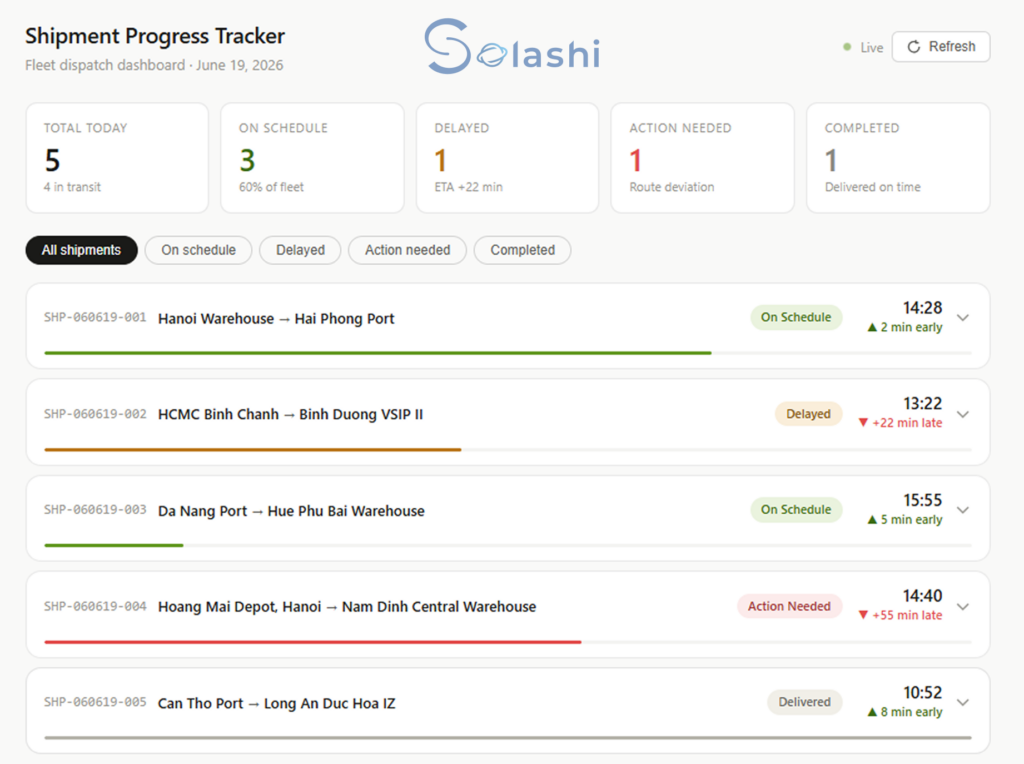
Your ops team sees all shipments on one screen. Green means on schedule. Orange means delayed. Red means action needed.
More importantly, the system does not wait for someone to notice a problem. It flags it first.
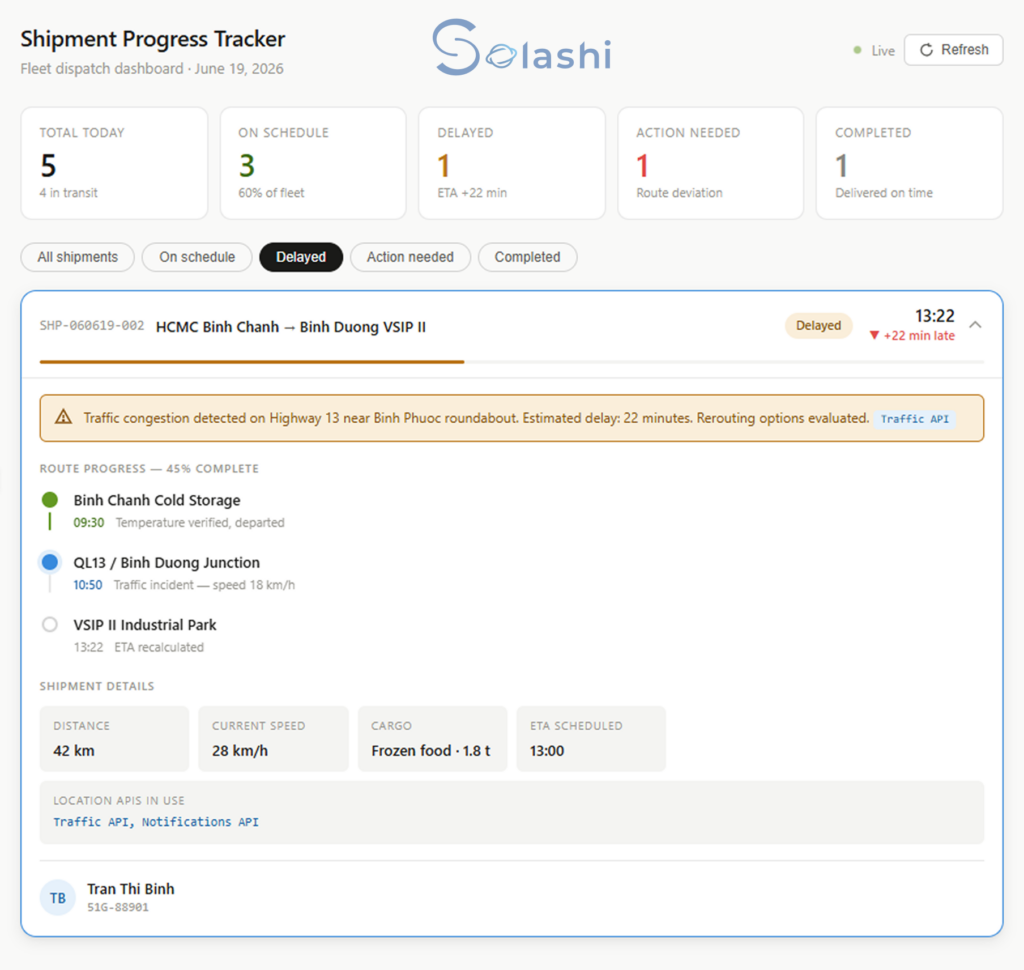
For example: traffic on Highway 13. Delay of 22 minutes. Rerouting options already checked. The team can respond before the client calls.
When a delivery is done, every step is logged.
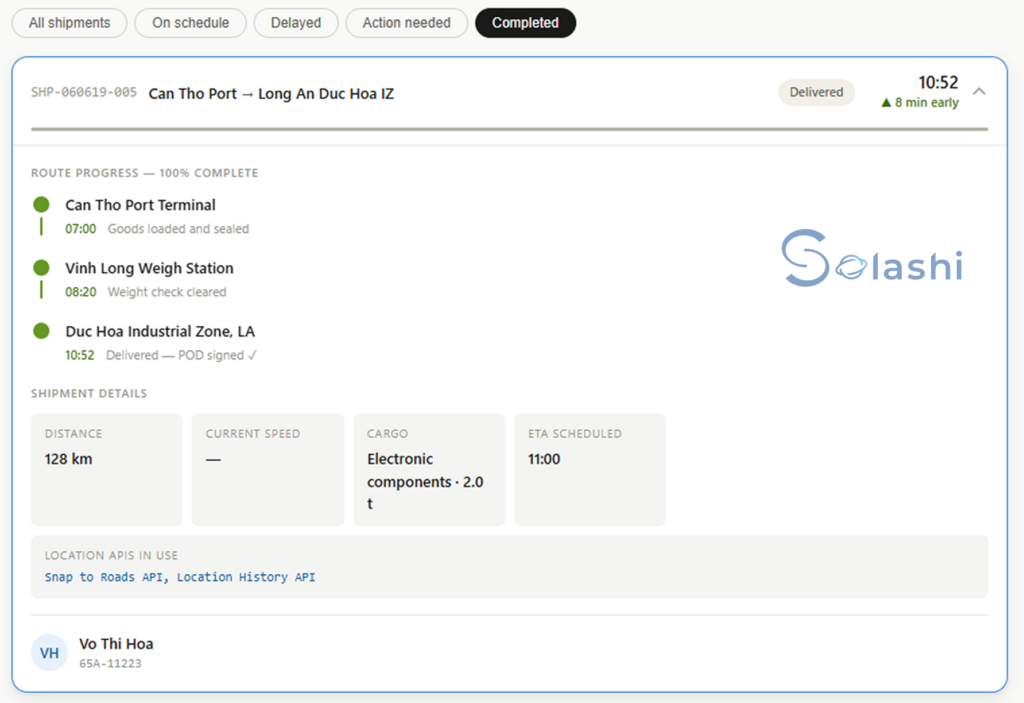
Can Tho Port. Vinh Long. Duc Hoa Industrial Zone: delivered, POD signed, 8 minutes early. No follow-up needed.
Layer Two: The Client-Facing Portal
Meanwhile, the client sees their own orders in real time.
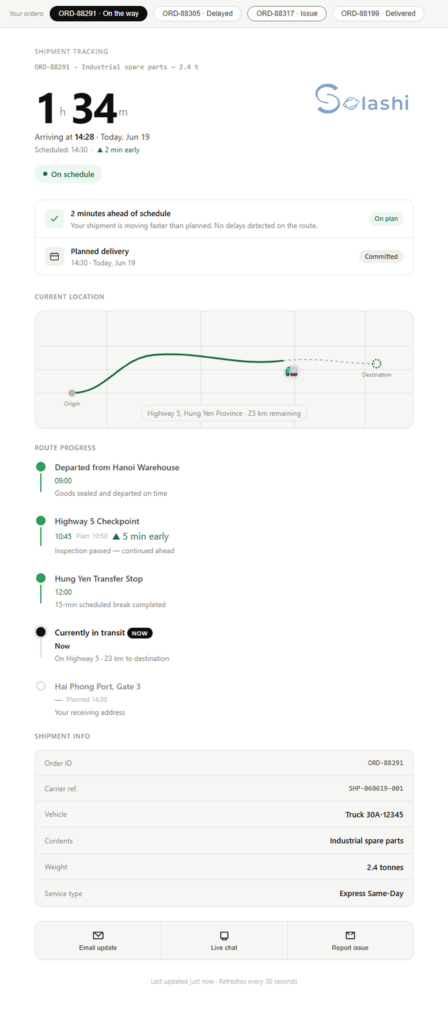
A live countdown to arrival. A route map. Step-by-step progress. A committed delivery time always visible.
The client does not need to call. The system tells them first.
When the delivery is done, the loop closes on its own.
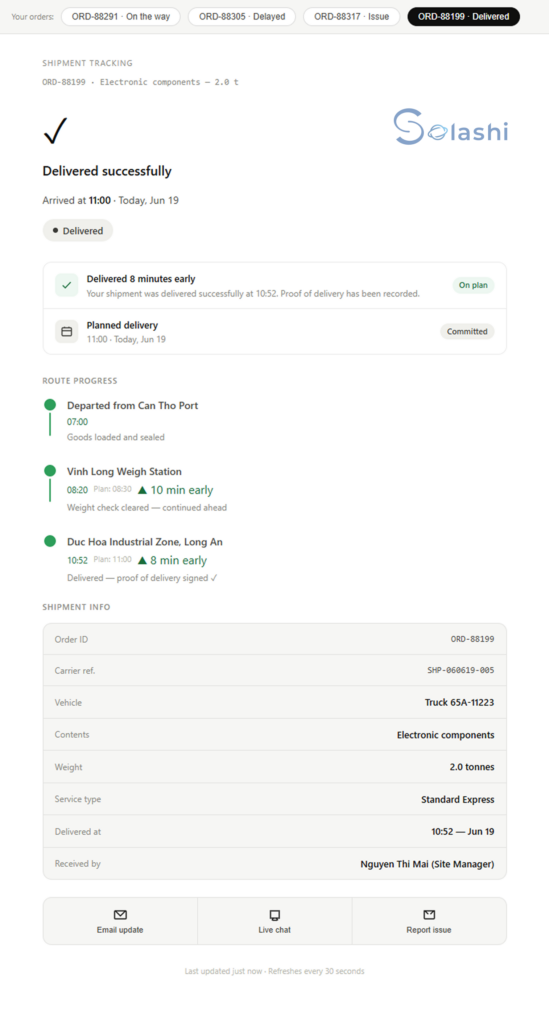
Checkmark. Timestamp. POD recorded. Received by name confirmed. No call needed from either side.
Layer Three: Performance Analytics
In addition, FreightView gives clients a broader view of their performance over time.
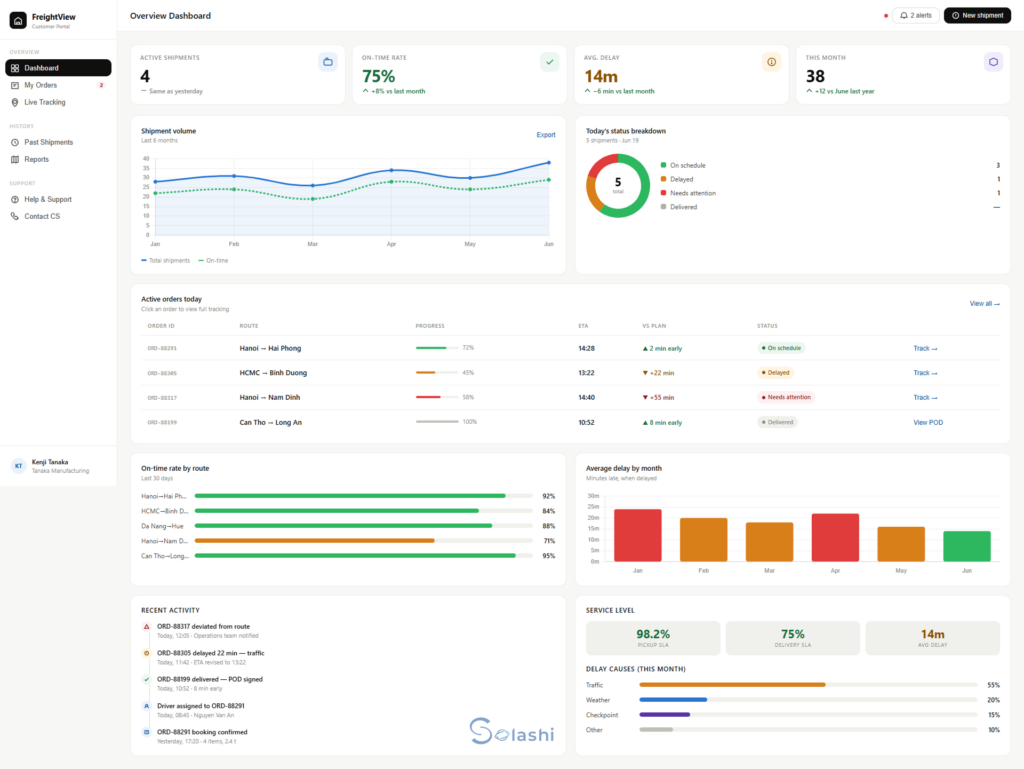
On-time rate. Average delay. Route performance. Delay causes by type. Six months of history.
As a result, the relationship moves from reactive updates to a real data partnership.
Layer Four: Human Support, Built Into the System
Furthermore, automation does not replace the need for a real person.
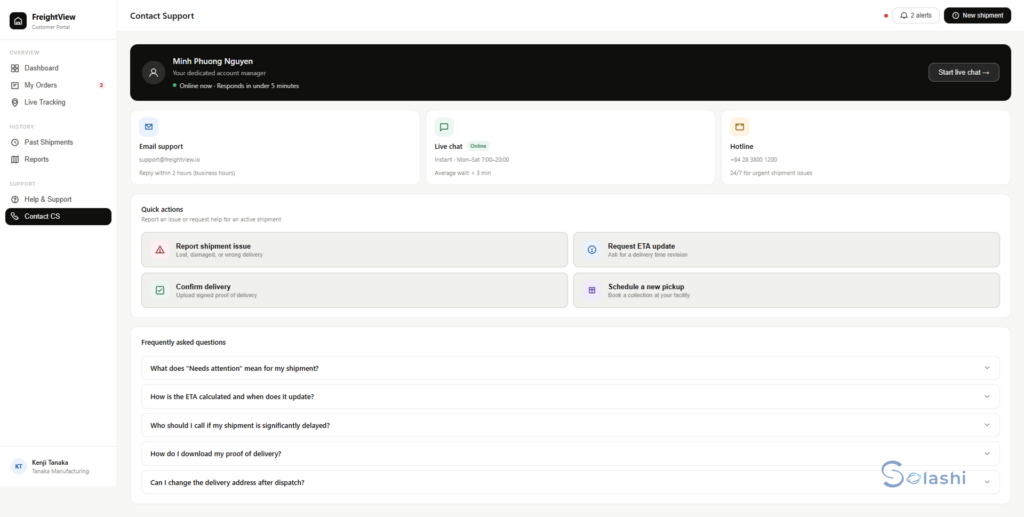
Every client has a named account manager inside the portal. Live chat. Email. 24/7 hotline for urgent issues. Quick buttons to report a problem, request an ETA update, or schedule a pickup.
So when something needs a human, the client knows exactly who to reach.
Why Custom Build?
Off-the-shelf tools can track shipments. But they cannot shape the client experience around your specific routes, your SLA terms, and your service model.
FreightView shows what is possible when software starts from a real pain point, not a feature list.
To understand how Solashi structures every software build from first meeting to final handover, read: The Software Development Process: 9 Critical Stages
The Real Question
If your team still handles status calls by hand, the question is not whether a better system exists. It is what waiting is costing you in time, in trust, and in renewals that quietly do not happen.
Solashi builds custom operational software for B2B services companies. Ready to close the gap? Book a 20-minute conversation.
FAQ
Q1: What is a CRM for logistics?
A CRM for logistics is a software system that manages the full client relationship across the delivery lifecycle — from order placement to proof of delivery. Unlike generic CRM tools, a logistics CRM connects operational data (shipment status, route progress, delays) directly to the client-facing layer. As a result, both your team and your clients see accurate, real-time information without manual updates.
Q2: How does a client-facing shipment tracking portal work?
A client portal pulls live data from your internal dispatch system and displays it in a simplified view for your B2B buyers. When a shipment moves, the portal updates automatically. When a delay occurs, the client sees it – along with a revised ETA – before they think to call. The portal runs on event-driven data, which means updates happen in real time without any manual input from your team.
Q3: What is proof of delivery (POD) in logistics?
Proof of delivery (POD) is a digital or physical record that confirms a shipment was delivered successfully. It typically includes a timestamp, the name of the person who received the goods, and a signature or confirmation code. In a modern logistics CRM, POD is recorded automatically at the point of delivery and made visible to the client instantly – closing the loop without any follow-up communication.
Q4: Can a logistics CRM reduce client churn?
Yes. According to Gartner’s supply chain research, client-facing visibility is one of the top drivers of vendor retention in B2B logistics. When clients can track their own orders in real time, they feel in control of their supply chain. That feeling of control reduces anxiety, reduces escalation calls, and increases the likelihood of renewal. A logistics CRM does not just improve operations – it protects revenue.
Q5: What is the difference between an internal dispatch dashboard and a client portal?
An internal dispatch dashboard is designed for your operations team. It shows all shipments, route progress, driver status, and alerts — with full operational detail. A client portal, by contrast, shows only what the client needs to see: their own orders, delivery status, milestones, and ETA. Both layers use the same underlying data. However, each presents a filtered, context-appropriate view for its audience.
Q6: How long does it take to build a custom logistics CRM?
The timeline depends on the scope and complexity of your requirements. A focused client portal with shipment tracking, status updates, and POD typically takes 8 to 16 weeks to design, build, test, and deploy. Larger systems with analytics dashboards, multi-client management, and deep API integrations may take longer. Solashi recommends starting with a scoped proof of concept – like FreightView – to validate the approach before committing to a full build.
Q7: Does Solashi build logistics CRM systems for companies outside Vietnam?
Yes. Solashi builds custom software for B2B companies across Southeast Asia, Japan, Singapore, Taiwan, and beyond. Our team works in English and Japanese, and all projects follow a structured 9-stage delivery process with clear deliverables at every stage. If you are evaluating a logistics CRM build, we are happy to start with a 20-minute scoping conversation.

